Features
Everything you need to personalise learning
Upload once. Adaptify handles the rest — generating, formatting, and personalising resources for every learner in your class.
Resource Generators
Create worksheets, quizzes, reading comprehensions, cloze passages, timelines, and more — all tailored to your topic and year group.
- 20+ generators covering reading, writing, assessment, and vocabulary
- Topic-aware — generates content from your source material
- Adjust difficulty level and reading age
- Block editor for post-generation tweaks
- Individualise what you generate into multiple versions — one for every learner
Accessibility Profiles
Build learner profiles with reading level, font, spacing, and colour preferences. When resources match the learner, they're more willing to start and more able to work independently. Profiles can be informed by professional assessments or your own knowledge of each student.
- Dyslexia-friendly fonts, colours, and spacing
- Custom line, word, and letter spacing
- Reading level adaptation
- Background colour overlays
Learning Packs
Generate personalised resources for every pupil in your class. Select lessons, tick classes, and download print-ready packs — one click for the whole day.
- Batch generation for whole classes
- Per-pupil formatting applied automatically
- Single or double-sided print layout
- PDF download ready for the photocopier
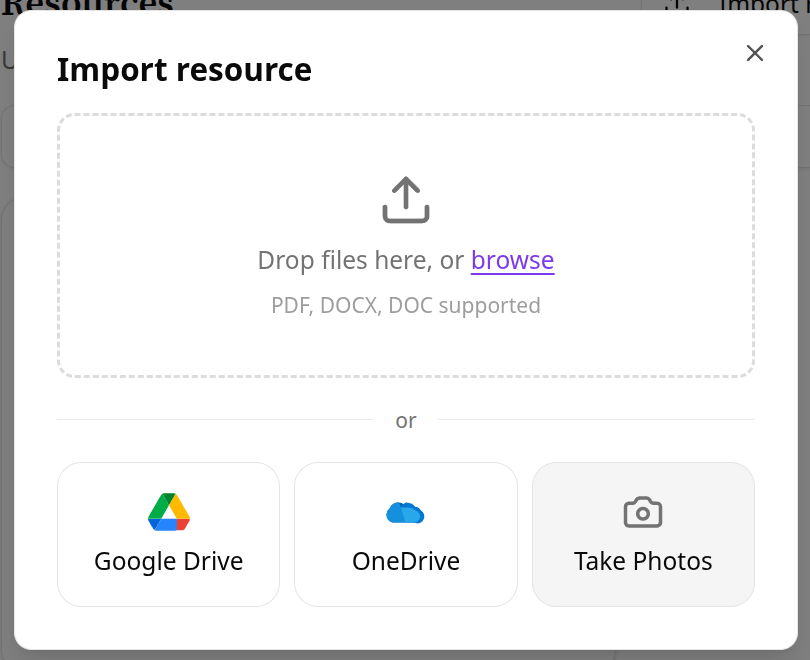
Google Drive & OneDrive
Import resources directly from your school’s cloud storage. No downloading, no re-uploading — just connect and go.
- Import from Google Drive or OneDrive in two clicks
- Supports PDF and Word documents
- Browse your existing folders without leaving Adaptify
- Works with school-managed Google Workspace and Microsoft 365 accounts
Camera Capture
Photograph a worksheet with your phone and import it directly. No scanning, no emailing PDFs to yourself — just capture and adapt.
- Capture from any phone camera
- Drag-and-drop page ordering
- Converts to structured, editable content automatically
- Works with printed worksheets and textbook pages
Get started
Ready to personalise your classroom resources?
Create an account in seconds. No credit card required.